Legal Text Collector
Legal Text CollectorCommunication
4.0294.00 Reviews
- Version
- 2.24.2
- Installs
- 100.00K
- Age Rating
- Everyone
Screenshots
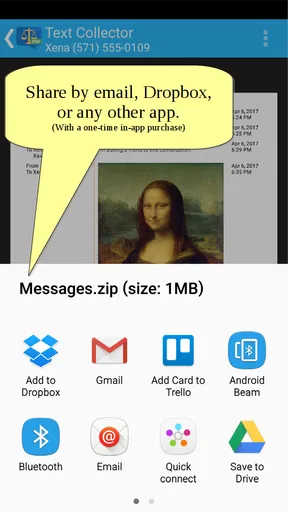
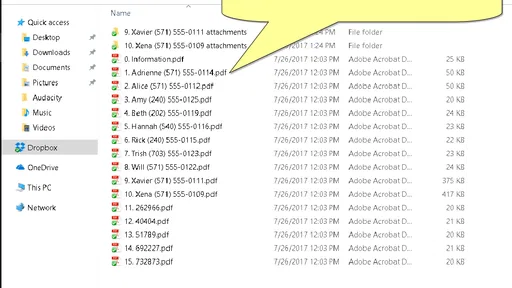
Our Review of Legal Text Collector
 Analysis by Appyee
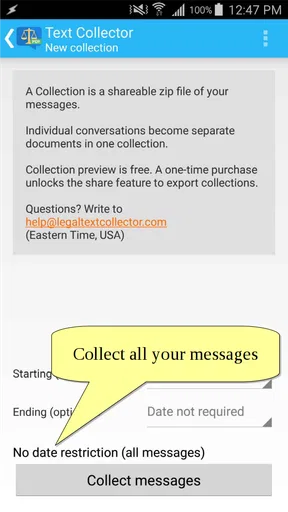
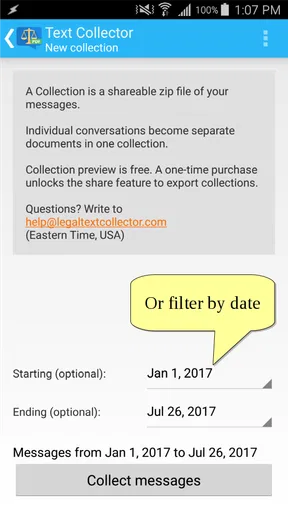
When a conversation contains instructions, an address, a receipt, or a promise that I may need later, taking a screenshot is often the quickest answer. It is not always the best one, though. Screenshots can be hard to search, awkward to print, and easy to lose among hundreds of images. Legal Text Collector takes a more focused approach: it is a communication app built around saving messages as PDF files. After testing it with that purpose in mind, I found it most useful as a small record-keeping tool rather than as a replacement for a full messaging app or document manager.
The appeal is easy to understand. Instead of leaving important text buried inside a chat, I can turn it into a document that is easier to store, share, or attach to another record. That matters for people who handle customer conversations, delivery arrangements, school notices, appointment details, or any exchange where keeping a readable copy is more practical than preserving an entire chat thread.
What the app is really for
Legal Text Collector comes from the developer Legal Text Collector and sits in the communication category. Its central promise is deliberately narrow: preserve messages in PDF form. I appreciate that focus because the app does not need to pretend it is a social network, a cloud drive, or a complete case-management system. Its usefulness depends on how often you need a clean, portable copy of text from a conversation.
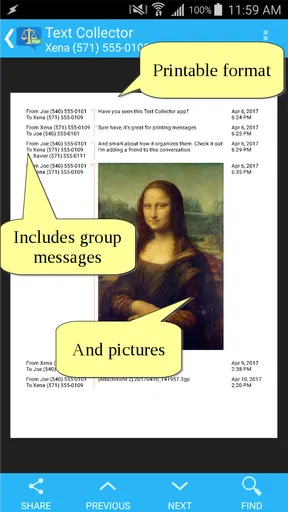
In everyday use, the PDF format is the important choice. A message inside a chat is tied to that app and sometimes to that particular phone. A PDF is easier to open in many places and can be filed with other documents. It also gives a conversation a more stable shape than a scrolling screen, which can be helpful when I want to review a sequence without jumping between messages.
That does not mean every conversation should be exported. Casual chats, temporary reminders, and messages I can easily find again are usually better left where they are. The app makes more sense when the text has a purpose beyond the moment: documenting an arrangement, keeping a reference copy, or preparing material that someone else needs to read.
The app is free to install, which makes trying it straightforward. Optional in-app purchases are listed at $2.49 per item. I would treat the free access as the chance to judge whether its workflow fits my habits, while the paid element should be considered only after I know exactly what extra value it provides in my own use. The important point is that the basic decision does not require an upfront purchase.
It is rated for Everyone, runs on Android starting with version 4.4, and the current version is 2.24.2. The app has passed the early-adopter stage: it has more than one hundred thousand installs, with an average rating of four out of five from over five hundred ratings and nearly three hundred written reviews. Those figures suggest a real user base, but I would still judge it by the specific export tasks I need rather than by popularity alone.
A practical workflow for important conversations
A useful routine is to export a message soon after an exchange becomes important, rather than waiting until the conversation has grown much longer. For example, imagine arranging a repair visit through messages. Once the date, arrival window, and agreed work are written down, I would save that part as a PDF and give the file a descriptive name. That creates a separate reference before later messages make the original details harder to locate.
The same habit works for a delivery instruction. If a seller sends a special drop-off note, I can preserve the wording before the order is completed. For a school or community group, a PDF copy of a timetable or instruction may be easier to forward to a family member than asking them to search through a chat. These are modest tasks, but they show where the app earns its place: it turns fleeting communication into something I can handle like a document.
One less obvious benefit is separation. Keeping an exported copy means I do not have to rely entirely on the original conversation remaining convenient to access. That can be useful when a chat becomes crowded, when I change how I organize files, or when another person needs the information without needing access to the full thread.
There is also a useful distinction between preserving text and preserving context. A PDF can make the words easier to keep, but it should not automatically be treated as a complete record of every surrounding detail. Before exporting, I would check that the relevant part of the conversation is included and that the wording is understandable without several missing replies. If a decision depends on who said what and when, I would make sure the saved material retains enough context to avoid confusion.
Where PDF export beats screenshots
Screenshots remain convenient, especially for a single short message. Their weakness appears when the material grows. Several images may need to be opened in sequence, their order can become unclear, and searching the text is less comfortable than reading a document. A PDF is generally a better handoff format when I want another person to read the exchange or keep it with related paperwork.
There is a trade-off, however. A screenshot can preserve the visual appearance of the original chat, including the surrounding interface. A text-focused PDF may be cleaner but may not communicate every visual detail in the same way. If the appearance of the conversation is itself important, I would not automatically discard screenshots just because a PDF is available. I would choose the format based on whether readability or visual context matters more.
Compared with copying and pasting text into a notes app, the advantage is organization around the final document. Manual copying gives me more control over editing, but it also creates opportunities to omit a line, change wording unintentionally, or lose track of where the text came from. Legal Text Collector is more appealing when I want a repeatable way to preserve the message rather than rewrite it into my own notes.
Compared with a general file scanner or document creator, the app has a narrower job. A scanner is better for paper documents, while a word processor is better for rewriting and formatting. This app is most convincing when the source is a message and the desired result is a PDF, not when I am trying to build a polished report from several different sources.
Small habits that make the result more useful
The first habit I recommend is naming files immediately. A filename based on the person, subject, and date is much more useful than a generic export name once several documents accumulate. I would also create a simple folder structure outside the app if my phone supports it, separating work, household, purchases, and personal records. The export is only half the job; retrieval is where the saved document proves its value.
The second is to export in logical groups. Saving every message individually may create a cluttered folder and make the conversation harder to follow. If the app allows the relevant exchange to be captured together, I would prefer one coherent document for one topic. If the conversation contains unrelated material, I would first identify the smallest useful section rather than preserving everything automatically.
The third is to review the PDF before sharing it. I would check that the text is complete, readable, and presented in the order I expect. This is especially important when the file is intended for someone who was not part of the original conversation. A document that makes sense to me because I remember the background may still be confusing to a recipient.
A fourth practical point concerns sensitive communication. A PDF can be easier to forward than the original chat, which is convenient but also increases the chance of accidental sharing. I would treat exported files as copies that need the same care as the original messages. Storing them in an obvious, unprotected location may be a poor choice for private conversations, even if the export itself is useful.
What the cost means in practice
The free installation lowers the barrier for occasional users. If I only need to save a few important conversations, I can test the workflow without committing money at the start. That is a meaningful advantage over tools that require a subscription before I can decide whether their central feature is worthwhile.
The optional $2.49-per-item purchases change the value calculation for frequent use. A single paid item may be reasonable if it removes a limitation that affects a regular work or documentation routine. For someone who exports only once in a while, the purchase may be harder to justify. I would not buy anything merely because the app feels useful in principle; I would first identify the exact task that the purchase improves.
This is also where the app differs from a general-purpose notes or cloud-storage service. Those alternatives may already be part of a user’s routine and may offer broader ways to organize information. Legal Text Collector can still be worthwhile if its direct message-to-PDF workflow saves enough effort, but the value comes from convenience and focus, not from replacing every other document tool.
In my view, the free entry point is strongest for cautious users who want to experiment. The paid side is more defensible for people with a recurring need to preserve communications and a clear reason to use the additional purchase. I would avoid evaluating it as though it were an all-in-one productivity suite; its value is concentrated in one specific conversion.
Limitations I would consider before relying on it
The narrow purpose is both the strength and the main limitation. If I need advanced document editing, annotations, OCR for paper pages, broad cloud collaboration, or a complete archive of many communication platforms, I would look elsewhere or combine this app with other tools. A focused exporter should not be expected to manage the entire life cycle of a record.
There is also a difference between creating a PDF and creating a legally complete record. The app’s name may make it sound suitable for formal evidence, but I would be careful about treating any exported document as automatically sufficient for a dispute or official process. The usefulness of a record depends on its completeness, surrounding context, and the requirements of the situation. For an important matter, I would preserve the original conversation as well and keep the PDF as a convenient copy.
Another limitation is that a document archive can become messy without a naming and storage routine. The app can help me produce a PDF, but it does not remove the need to decide where files belong or how long they should be retained. Users who want automatic organization may prefer a broader document-management solution.
I would also skip it if my normal need is simply to send one message to another person. Copying the text may be faster, and a screenshot may communicate the original appearance better. The app earns its place when persistence, portability, and a document format matter more than speed for a one-off exchange.
Who will get the most value
I see the best fit among freelancers, small-business owners, coordinators, parents, students, and anyone who regularly receives useful instructions through messaging. A freelancer can keep a client’s agreed brief, a parent can preserve an activity notice, and a student can save a project instruction without leaving it buried in a group chat. None of these users needs a complicated system; they need a dependable way to turn selected messages into files.
It can also suit people who are not comfortable building their own workaround with screenshots, copy-and-paste, and manual document creation. The focused purpose makes the learning curve easier to understand. I would still spend a few minutes establishing a file-naming habit, because that small step determines whether the archive remains useful a month later.
On the other hand, I would recommend skipping it for someone who rarely needs message records, already has a comfortable export function in their preferred communication platform, or primarily works with scanned paperwork. I would also choose a more comprehensive document tool for teams that need shared editing, permissions, version history, and a central archive rather than occasional PDF creation.
My recommendation after using it
Legal Text Collector is worth trying when your real problem is turning selected messages into readable PDF records. Its free installation makes that trial low-risk, and its focused workflow is easier to justify than a large toolset filled with features I may never use. I especially like it for practical records such as arrangements, instructions, and confirmations that need to survive beyond the original chat.
I would keep expectations realistic. This is not a substitute for a messaging platform, a full document-management system, or careful record-handling practices. The paid option should be judged by the exact improvement it brings to a repeated workflow, not by the presence of an in-app purchase alone. If screenshots already solve my needs, or if I require sophisticated editing and collaboration, another option will probably serve me better.
For the right user, though, the app solves an annoying little problem cleanly: important words stop being trapped in a scrolling conversation and become a file I can organize and revisit. That is a specific benefit, not a universal one. I would recommend it to anyone who often says, “I need to keep this message,” and wants something more orderly than a growing collection of screenshots.
Verdict
Strengths of Legal Text Collector
- Quickly saves legal text for later reference.
- Useful for organizing clauses, terms, and legal notes.
- Search makes stored text easier to find.
- Lightweight design should use minimal device storage.
- Helpful for students, researchers, and legal professionals.
Limitations of Legal Text Collector
- May require manual copying and organizing of collected text.
- Stored content may lack source links or citation details.
- Privacy depends on how sensitive legal text is handled.
- Limited value if you rarely work with legal documents.
- Text formatting may not remain consistent after collection.
Similar Picks in This Category
View All
Google Messages
Google LLC4.6

Gmail
Google LLC4.1

Google Meet
Google LLC4.4

Google Chrome
Google LLC4.1

WhatsApp Messenger
WhatsApp LLC4.6

Carrier Services
Google LLC4.2
Frequently Asked Questions
What is Legal Text Collector, and who is it designed for?
Legal Text Collector is an app intended to help users gather, organize, and manage legal text or document-related information in one place. It may be useful for students, researchers, legal professionals, businesses, or anyone handling large amounts of legal material. Before downloading, users should review the app’s description carefully to confirm that its tools match their workflow and that it supports the type of content they need to collect.
Can Legal Text Collector replace professional legal advice or legal document review?
No. Legal Text Collector should be considered an organizational or research tool rather than a substitute for a qualified lawyer. Information collected through the app may require interpretation, verification, and review against current laws and official sources. Legal rules can vary by country, state, or situation, so users should consult an appropriately licensed legal professional before relying on any material for contracts, disputes, compliance decisions, or other important legal matters.
What kind of information can I collect and organize with the app?
The exact capabilities depend on the version available for your device, but an app with this purpose may allow users to save legal passages, notes, references, links, or other text-based material. Before installing, check whether it supports features such as categorization, search, editing, exporting, copying, or synchronization. If you need to manage complete legal files, confirm whether the app supports document attachments and the formats you regularly use.
Is my collected legal information private and secure?
Privacy is especially important when collecting contracts, case notes, personal information, or confidential business material. Before using Legal Text Collector for sensitive content, read its privacy policy and check how data is stored, transmitted, backed up, and shared. You should also review requested permissions, use a strong device passcode, and avoid entering confidential information unless the app provides security measures that meet your personal or professional requirements.
Does Legal Text Collector work offline, and is it available for Android or iOS?
Offline availability and platform support can vary according to the current release, so users should verify the app’s official store listing before downloading. If offline use is supported, you may be able to review or add collected text without an internet connection, although synchronization or online features could require access later. Also check device compatibility, operating-system requirements, subscription details, and whether the same data is available across Android and iOS.
